


Loops By CDUB
3.5196.00 Reviews
App Specs
- Version
- 5.0
- Updated On
- License
- Free
- Downloads
- 100,000+
- Developer
- The C-Dub Brand
- Categories
- Music & Audio
- Platform
- Android
Screenshots
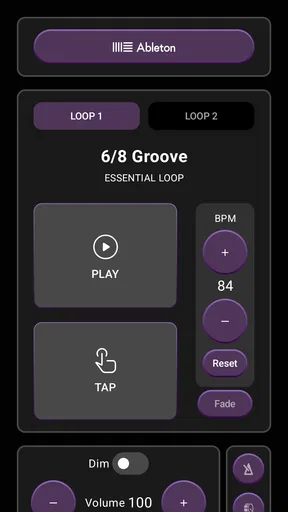
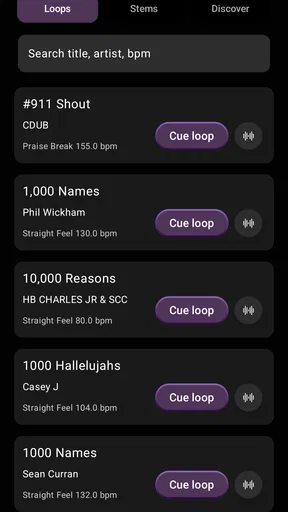
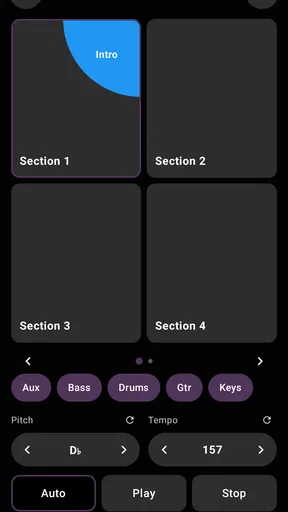
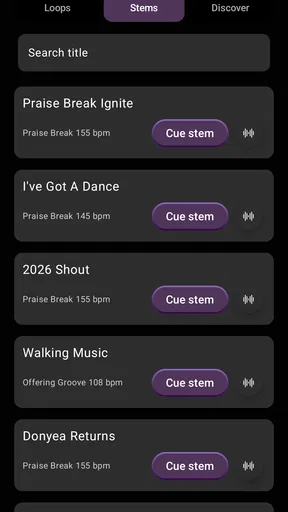
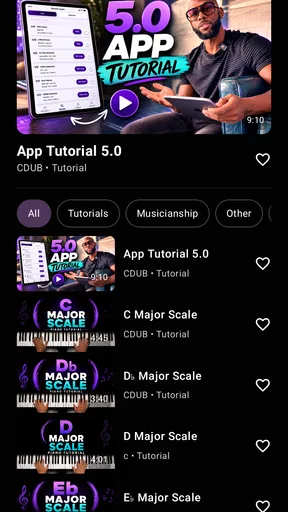
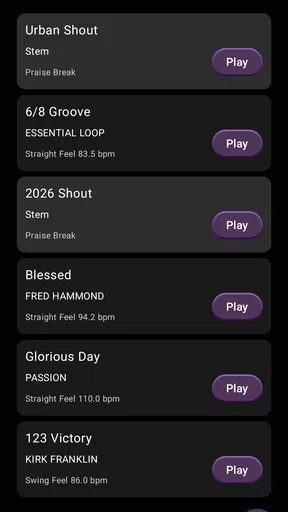
 Analysis by AppCompare
If you’re trying to practise with a steady gospel groove or need a dependable musical reference during a rehearsal, Loops By CDUB is aimed at that specific job. I’d approach it as a focused music tool rather than a general-purpose beat maker: its appeal is having drum loops and click tracks ready to support practice or performance, not replacing a recording studio or a full arrangement app.
That focus is useful for a first-time user. You do not need to arrive with a complicated production plan; a sensible first goal is simply to find a groove that suits your instrument, start it, and play along. The app is free to install, though in-app purchases range from $9.99 to $199.99 per item, so I’d check what is available to you before building a routine around a particular pack. The basic decision is whether its gospel-oriented material fits the music you actually play.
Who will get the most from it
I can see this being most helpful to a drummer who wants a consistent backing pulse, a keyboard player practising changes, or a guitarist who tends to speed up when a passage gets difficult. A click track can expose timing habits that are easy to miss when practising alone, while a drum loop gives you a more musical feel to play against. For a church musician preparing a part outside rehearsal, that difference can make practice feel less abstract.
It is also a practical option for a bandleader who wants a repeatable groove for a run-through. Rather than asking someone to play the same pattern while everyone checks an arrangement, you can use a backing reference and spend the rehearsal listening to the parts that need attention. That does not mean every group will want a phone at the center of rehearsal: if the band already has a drummer and a clear count-in, a separate loop may add more setup than value.
Choosing a first practice session
To get a useful first result, I’d keep the session deliberately small. Pick one passage you already know, choose a loop or click that supports its feel, and play the passage without trying to add extra layers or change several settings at once. If it feels wrong, adjust one thing and try again. That makes it easier to tell whether the issue is the groove, the pace, or your own playing, instead of turning the first session into a search through controls.
A realistic use case is a short practice slot before leaving for work or before a rehearsal. I’d use the time to repeat a tricky transition with the same pulse, then play the full section once without stopping. The goal is not to create a finished track on the phone; it is to arrive with steadier timing and a clearer sense of where the music should sit. For that kind of repeatable practice, a dedicated loop tool can be more convenient than opening a larger music-production app and navigating a project screen.
What to check before relying on it live
Practice and performance have different demands. At home, you can stop, adjust, and try again. On stage, you need to know how you will start the backing, keep it audible against the room, and recover if you select the wrong item. I’d rehearse those steps before using any phone-based backing in front of an audience, including checking the device’s sound path and making sure the musician responsible for it can reach the controls without interrupting the performance.
Worth Reading Before You Choose

Flipboard Shows What News Apps Must Do Beyond the Feed

Switching to Android Auto Means Rethinking Your Driving Routine

Google Calendar Makes a Crowded Week Easier to Manage

Ludo King Makes the Most of the Minutes Between Plans

Baby Panda World Brings Quick Play to Modern Phones, but Its Game Library Feels Busy

ESPN’s Live Game View Makes Following Close Games Easier
There is a trade-off in using prepared loops: they give you a steady reference, but they will not automatically follow a band that changes tempo, extends a section, or takes an unexpected ending. If your group relies on flexible cues and spontaneous changes, a live drummer or a more adaptable playback setup may be a better fit. If the arrangement is settled and the main need is a consistent pulse, loops can make a useful safety net.
How it differs from broader music apps
Compared with a general metronome, a gospel loop can feel more like playing with a band than practising against a bare click. That can help when you are learning to sit into a groove, but it is not always the best choice for diagnosing precise timing: a simple metronome leaves less rhythmic detail to lean on. I’d use a click for focused subdivision work and a drum loop when the musical feel is the part I need to practise.
Compared with a full digital audio workstation, this app’s narrower purpose is a plus if you want to get playing quickly. A DAW is the better option when you need to record, edit, arrange, or build a song from scratch. Here, the practical question is whether the available loop material and controls suit your rehearsal needs. Keeping those roles separate helps avoid expecting one app to be both a rehearsal companion and a complete production environment.
The developer is The C-Dub Brand, and the app sits in the music and audio category. It has an average rating of 3.5 from around 500 ratings, with over 100,000 installs, so it has found an audience while also drawing mixed reactions. It is free to install, rated for Everyone, and its current version is 5.0. Those details make it easy to try, but the rating is a reminder to judge it against your own needs rather than assume every musician will find the same fit.
Getting Started with Loops By CDUB
The first thing I noticed about Loops By CDUB is how user-friendly it is. Even if you're a total newbie, you'll find your way around in no time. The app is available on both Android and iOS, so you're covered no matter what device you're using. I downloaded it from the App Store, and within minutes, I was looping away.
Once installed, the app opens up to a simple interface. You won’t find any clutter here, just a clean layout that makes navigation a breeze. The main menu gives you access to different loop packs, and trust me, there's a lot to choose from.
Exploring the Features
One of the coolest features is the extensive library of loop packs. Whether you're into gospel, R&B, hip-hop, or even rock, there's something here for everyone. I was particularly impressed by the quality of the sound. It's crisp, clear, and professional-grade, which is a big plus for anyone trying to avoid that tinny, amateur sound.
Adding loops to your project is super straightforward. Just tap on a loop pack, and you can see all the available tracks. You can preview them, and if you like what you hear, just add them to your session with a simple tap. It's as easy as pie, and it makes creating music on the go a real joy.
Customization and Control
Beyond just adding loops, Loops By CDUB lets you customize your sound. You can adjust the tempo and key, which is great when you're trying to match loops to your existing tracks. It's all about making sure everything fits together nicely, and this app gives you the control you need.
Another feature that caught my eye is the ability to layer different loops. You can stack them to create a fuller sound, and the mix comes out surprisingly well-balanced. This feature is perfect for building complex compositions without needing a full studio setup.
Performance and Usability
Now, let's talk about performance. I've used other music apps before, and sometimes they can lag or crash at the worst times. Not with Loops By CDUB. The app runs smoothly, even when I've got multiple loops running simultaneously. It seems well-optimized for both Android and iOS, which is a relief.
As for usability, I think the developers hit the nail on the head. Everything is intuitive. The drag-and-drop functionality is spot on, and the app responds well to touch inputs. Whether I'm selecting a loop or adjusting the tempo, it's all very fluid.
Why You Should Try It
So, why should you give Loops By CDUB a shot? Well, if you’re a musician looking for a reliable looping tool, this app has got you covered. It's perfect for live performances, practice sessions, or even casual jamming. The versatility and quality of the loop packs mean you can explore different genres and find your unique sound.
Plus, it's just plain fun to use. The satisfaction of layering loops and hearing your creation come to life is something every music lover should experience. Whether you're a pro or just starting, this app provides a platform to unleash your creativity.
In conclusion, Loops By CDUB has become a staple in my music-making toolkit. It's reliable, feature-rich, and just the kind of app you want for creating music on the fly. So, if you haven't already, give it a whirl. You might just find it's exactly what you've been missing.
Pros
- Intuitive interface makes music creation easy.
- Wide range of loops for various genres.
- High-quality audio samples enhance creativity.
- Regular updates keep content fresh.
- Offline mode available for on-the-go use.
Cons
- Limited free content; in-app purchases needed.
- Some loops lack customization options.
- Occasional app crashes disrupt workflow.
- Interface can be cluttered for beginners.
- Requires significant storage space.
FAQs for Loops By CDUB
What is the primary purpose of the Loops By CDUB app?
Loops By CDUB is designed for musicians, particularly those in live performance settings, to enhance their music with high-quality backing loops. The app offers a variety of genres and loop options, allowing users to seamlessly integrate these loops into their sets, enhancing the overall sound and experience.
Is Loops By CDUB suitable for beginners or only for professional musicians?
Loops By CDUB is user-friendly and caters to both beginners and professional musicians. The app provides an intuitive interface that makes it easy for anyone to navigate and use the loops effectively, regardless of their experience level. Tutorials and support are also available to help new users get started.
Does the app require an internet connection to use the loops?
Once you have downloaded the loops, Loops By CDUB operates offline, allowing musicians to use it without an internet connection. This feature is particularly useful for live performances in environments where Wi-Fi is unavailable or unreliable, ensuring uninterrupted usage.
What types of loops are available within the app?
Loops By CDUB offers an extensive library covering a wide range of genres including gospel, hip-hop, jazz, and more. Users can browse and download loops tailored to their specific musical needs, ensuring they have the right tools for any performance or recording session.
Are there any in-app purchases or subscription fees associated with Loops By CDUB?
While the app itself may be free to download, there are in-app purchases available for additional loops and features. Users can opt to purchase individual loops or subscribe to gain access to the full library, providing flexibility depending on budget and needs.


